Add Multiple Pallet Instances

Introduction
The Polkadot SDK Parachain Template provides a solid foundation for building custom parachains. While most pallets are typically included as single instances within a runtime, some scenarios benefit from running multiple instances of the same pallet with different configurations. This approach lets you reuse pallet logic without reimplementing it, enabling diverse functionality from a single codebase.
For example, you could create multiple governance councils with different voting rules, or several token systems with distinct parameters. The Polkadot SDK makes this possible through instantiable pallets, which allow multiple independent instances of the same pallet to coexist within a runtime.
This guide demonstrates how to add and configure multiple instances of a pallet to your runtime using pallet-collective as a practical example. The same process applies to other instantiable pallets.
In this guide, you'll learn how to:
- Identify instantiable pallets and understand their structure.
- Configure multiple instances of the same pallet with unique parameters.
- Register multiple pallet instances in your runtime.
- Run your parachain locally to test multiple pallet instances.
Check Prerequisites
Before you begin, ensure you have:
- A working Polkadot SDK development environment.
- Basic understanding of adding pallets to a runtime.
Understanding Instantiable Pallets
Not all pallets support multiple instances. Instantiable pallets are specifically designed to allow multiple independent copies within the same runtime. These pallets include an additional generic parameter I that creates a unique identity for each instance.
Identifying an Instantiable Pallet
You can identify an instantiable pallet by examining its Pallet struct definition. An instantiable pallet will include both the standard generic T (for the runtime configuration) and the instantiation generic I:
The I generic parameter:
- Creates a unique type identity for each pallet instance.
- Appears throughout the pallet's components (
Configtrait, storage items, events, errors). - Defaults to
()(unit type) when only one instance is needed. - Must be explicitly specified when creating multiple instances.
How Instance Generics Work
The instantiation generic I affects how the pallet's types are structured:
Configtrait:trait Config<I: 'static = ()>- accepts the instance parameter.- Storage items: Automatically namespaced by instance to prevent conflicts.
- Events:
Event<T, I>- includes instance information. - Calls:
Call<T, I>- dispatched to the correct instance.
This design ensures that multiple instances of the same pallet maintain completely separate states and don't interfere with each other.
Add Multiple Instances of a Pallet to Your Runtime
Adding multiple pallet instances involves the same basic steps as adding a single pallet, but with specific configuration for each instance.
In this example, you'll add two instances of pallet-collective to create different governance bodies.
Add the Pallet as a Dependency
First, ensure the instantiable pallet is available in your runtime dependencies. For pallet-collective, add it as a feature of the polkadot-sdk dependency:
- Open the
runtime/Cargo.tomlfile. - Locate the
[dependencies]section. - Find the
polkadot-sdkdependency. -
Add
pallet-collectiveto the features array:
Enable Standard Library Features
Ensure the pallet's standard library features are enabled for native builds:
- In the
runtime/Cargo.tomlfile, locate the[features]section. -
Ensure
polkadot-sdk/stdis included in thestdarray:
Review the Config Trait
Before configuring multiple instances, understand what the pallet requires. The pallet-collective Config trait is defined with the instance generic:
pub trait Config<I: 'static = ()>: frame_system::Config {
    /// The runtime origin type
    type RuntimeOrigin: From<RawOrigin<Self::AccountId, I>>;

    /// The runtime call type
    type Proposal: Parameter
        + Dispatchable<RuntimeOrigin = Self::RuntimeOrigin>
        + From<frame_system::Call<Self>>;

    /// The overarching event type
    type RuntimeEvent: From<Event<Self, I>>
        + IsType<<Self as frame_system::Config>::RuntimeEvent>;

    /// Duration in blocks for a motion to remain active
    type MotionDuration: Get<BlockNumberFor<Self>>;

    /// Maximum number of proposals allowed at once
    type MaxProposals: Get<u32>;

    /// Maximum number of members in the collective
    type MaxMembers: Get<u32>;

    /// Default voting strategy when a member abstains
    type DefaultVote: DefaultVote;

    /// Origin that can modify the members
    type SetMembersOrigin: EnsureOrigin<Self::RuntimeOrigin>;

    /// Weight information for extrinsics
    type WeightInfo: WeightInfo;

    /// Maximum weight for a proposal
    type MaxProposalWeight: Get<Weight>;

    /// Origin that can disapprove proposals
    type DisapproveOrigin: EnsureOrigin<Self::RuntimeOrigin>;

    /// Origin that can kill proposals
    type KillOrigin: EnsureOrigin<Self::RuntimeOrigin>;

    /// Consideration mechanism (e.g., deposits)
    type Consideration: Consideration<Self::AccountId>;
}
This configuration enables the collective pallet to manage a group of accounts that can propose and vote on proposals together.
Define Pallet Parameters
Before implementing the Config trait for each instance, define the common parameters that both instances will use. These parameters are defined once and can be shared across instances or customized per instance.
To define pallet parameters:
- Open the
runtime/src/configs/mod.rsfile. -
Add parameter type definitions for the collective pallet:
Tip
You can define separate parameters for each instance if you need different configurations. For example, you might want a technical committee with a shorter motion duration and fewer members than a general council.
Import Instance Types
Each pallet instance needs a unique type identifier. The Polkadot SDK provides numbered instance types (Instance1, Instance2, etc.) in the frame_support::instances module.
In the runtime/src/configs/mod.rs file, import the instance types:
These instance types:
- Create distinct identities for each pallet instance.
- Are used when implementing the
Configtrait and adding to the runtime construct. - Are provided by
frame_support, not by individual pallets.
Implement Config Trait for First Instance
Now implement the Config trait for your first instance. The implementation includes the instance type as a generic parameter.
In the runtime/src/configs/mod.rs file, add the following implementation:
/// Configure the Technical Committee collective
impl pallet_collective::Config<Instance1> for Runtime {
    type RuntimeOrigin = RuntimeOrigin;
    type Proposal = RuntimeCall;
    type RuntimeEvent = RuntimeEvent;
    type MotionDuration = MotionDuration;
    type MaxProposals = MaxProposals;
    type MaxMembers = MaxMembers;
    type DefaultVote = pallet_collective::MoreThanMajorityThenPrimeDefaultVote;
    type SetMembersOrigin = EnsureRoot<AccountId>;
    type WeightInfo = pallet_collective::weights::SubstrateWeight<Runtime>;
    type MaxProposalWeight = MaxProposalWeight;
    type DisapproveOrigin = EnsureRoot<Self::AccountId>;
    type KillOrigin = EnsureRoot<Self::AccountId>;
    type Consideration = ();
}
Key configuration details:
RuntimeOrigin,RuntimeCall,RuntimeEvent: Connect to the runtime's aggregated types.MotionDuration: How long proposals remain active (5 days in this example).MaxProposals: Maximum number of active proposals (100).MaxMembers: Maximum collective members (100).DefaultVote: Voting strategy when members abstain (majority with prime member tiebreaker).SetMembersOrigin: Who can modify membership (root in this example).MaxProposalWeight: Maximum computational weight for proposals (50% of block weight).DisapproveOrigin/KillOrigin: Who can reject proposals (root in this example).Consideration: Deposit mechanism (none in this example).
Implement Config Trait for Second Instance
Implement the Config trait for your second instance with the same or a different configuration.
In the runtime/src/configs/mod.rs file, add the following implementation:
/// Configure the Council collective
impl pallet_collective::Config<Instance2> for Runtime {
    type RuntimeOrigin = RuntimeOrigin;
    type Proposal = RuntimeCall;
    type RuntimeEvent = RuntimeEvent;
    type MotionDuration = MotionDuration;
    type MaxProposals = MaxProposals;
    type MaxMembers = MaxMembers;
    type DefaultVote = pallet_collective::MoreThanMajorityThenPrimeDefaultVote;
    type SetMembersOrigin = EnsureRoot<AccountId>;
    type WeightInfo = pallet_collective::weights::SubstrateWeight<Runtime>;
    type MaxProposalWeight = MaxProposalWeight;
    type DisapproveOrigin = EnsureRoot<Self::AccountId>;
    type KillOrigin = EnsureRoot<Self::AccountId>;
    type Consideration = ();
}
Tip
While this example uses identical configurations for both instances, you can customize each instance's parameters to serve different purposes. For example, you might configure the technical committee with stricter voting requirements or shorter motion durations than the general council.
Add Instances to Runtime Construct
The final configuration step is registering both pallet instances in the runtime construct. Each instance needs a unique pallet index and must specify its instance type.
To add the pallet instances to the runtime construct:
- Open the
runtime/src/lib.rsfile. - Locate the
#[frame_support::runtime]section. -
Add both pallet instances with unique indices:
runtime/src/lib.rs#[frame_support::runtime] mod runtime { #[runtime::runtime] #[runtime::derive( RuntimeCall, RuntimeEvent, RuntimeError, RuntimeOrigin, RuntimeTask, RuntimeFreezeReason, RuntimeHoldReason, RuntimeSlashReason, RuntimeLockId, RuntimeViewFunction )] pub struct Runtime; #[runtime::pallet_index(0)] pub type System = frame_system; #[runtime::pallet_index(1)] pub type ParachainSystem = cumulus_pallet_parachain_system; // ... other pallets #[runtime::pallet_index(50)] pub type TechnicalCommittee = pallet_collective<Instance1>; #[runtime::pallet_index(51)] pub type Council = pallet_collective<Instance2>; }
Important considerations when adding instances:
- Unique indices: Each instance must have a different
pallet_index. - Instance type: Specify the instance type in angle brackets (e.g.,
<Instance1>). - Descriptive names: Use names that reflect the instance's purpose (e.g.,
TechnicalCommittee,Council). - Index management: Track which indices are used to avoid conflicts.
Warning
Duplicate pallet indices will cause compilation errors. Keep a list of used indices to prevent conflicts when adding new pallets or instances.
Verify the Runtime Compiles
After adding and configuring both pallet instances, verify that everything is set up correctly by compiling the runtime from your project's root directory:
Ensure the build completes successfully without errors.
This command validates:
- All pallet instances are properly configured
- No index conflicts exist
- Type definitions are correct
- Dependencies are properly resolved
Run Your Chain Locally
Now that you've added multiple pallet instances to your runtime, you can launch your parachain locally to test the new functionality using the Polkadot Omni Node. For instructions on setting up the Polkadot Omni Node and Polkadot Chain Spec Builder, refer to the Set Up the Parachain Template page.
Generate a Chain Specification
Create a new chain specification file with the updated runtime containing both pallet instances by running the following command from your project's root directory:
chain-spec-builder create -t development \
    --relay-chain paseo \
    --para-id 1000 \
    --runtime ./target/release/wbuild/parachain-template-runtime/parachain_template_runtime.compact.compressed.wasm \
    named-preset development
This command generates a chain specification file (chain_spec.json) for your parachain with the updated runtime.
Start the Parachain Node
Launch the parachain using the Polkadot Omni Node with the generated chain specification:
Verify the node starts successfully and begins producing blocks. You should see log messages indicating that both pallet instances are initialized.
Interact with Both Pallet Instances
Use the Polkadot.js Apps interface to verify you can interact with both pallet instances independently.
To interact with the pallet instances:
- Navigate to Polkadot.js Apps.
- Ensure you're connected to your local node at
ws://127.0.0.1:9944. - Go to the Developer > Extrinsics tab.
-
In the submit the following extrinsic section, open the pallet dropdown. Verify that both pallet instances appear and contain the expected extrinsics.
Select
technicalCommitteeand open the extrinsics dropdown.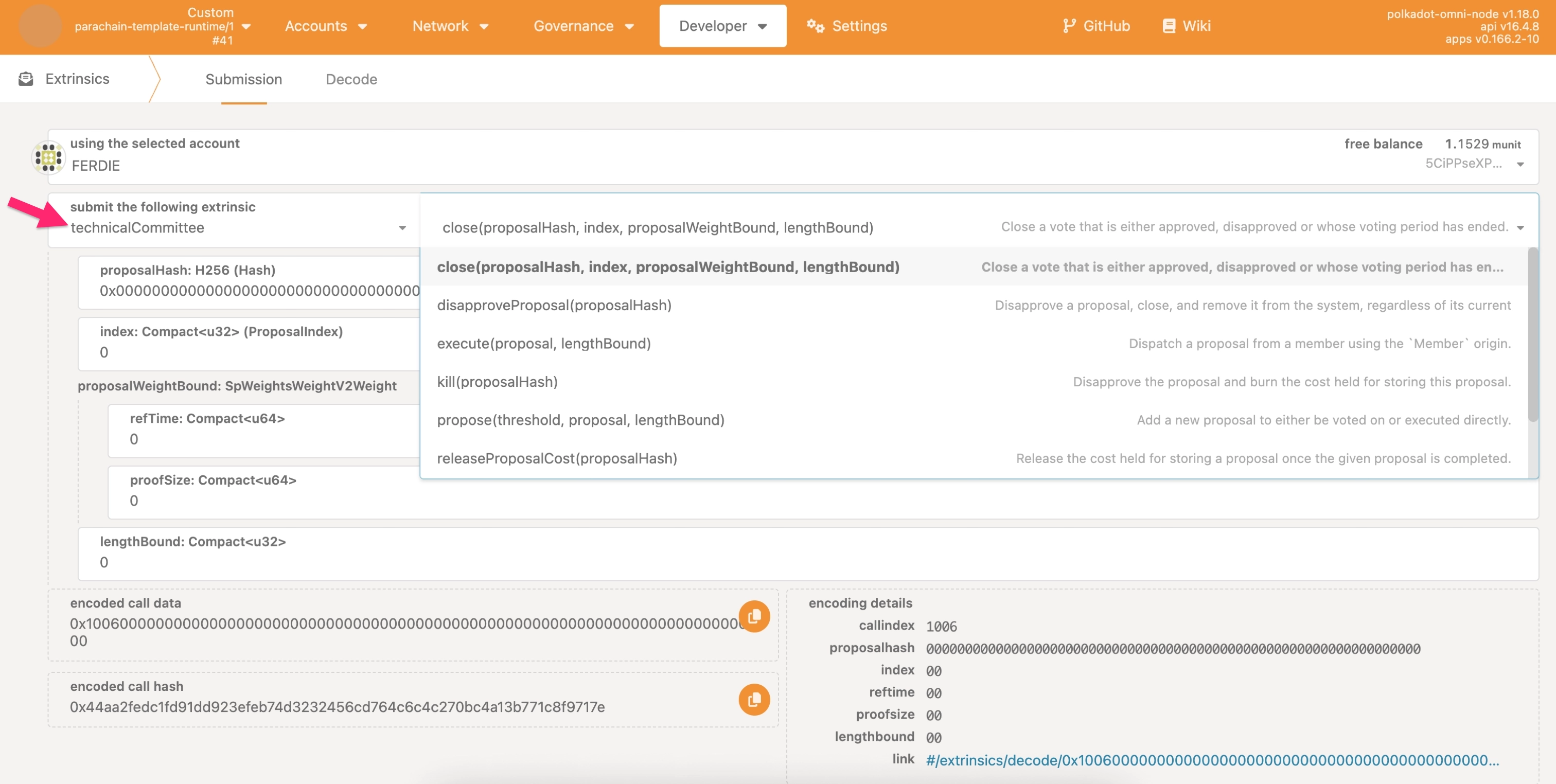
Select
counciland open the extrinsics dropdown.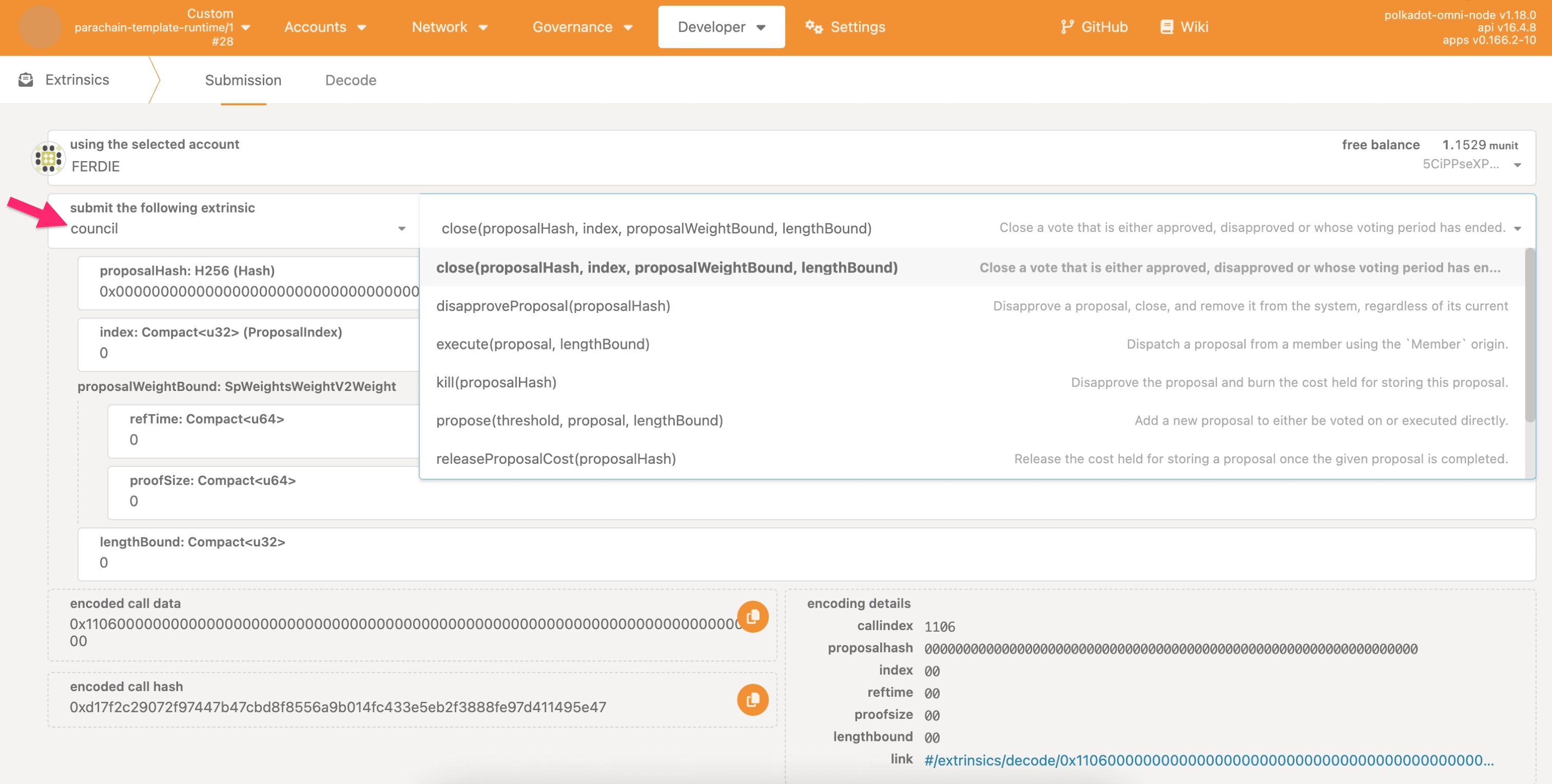
Each instance should display the following extrinsics (this is not an exhaustive list):
close(proposalHash, index, proposalWeightBound, lengthBound): Close voting.propose(threshold, proposal, lengthBound): Submit a proposal.setMembers(newMembers, prime, oldCount): Update membership.vote(proposal, index, approve): Vote on a proposal.
Test Instance Independence
Verify that both instances operate independently by testing their separate functionality.
To test instance independence:
- In Polkadot.js Apps, go to Developer > Chain state.
-
Query storage for each instance:
Select
technicalCommittee>members()to view technical committee members.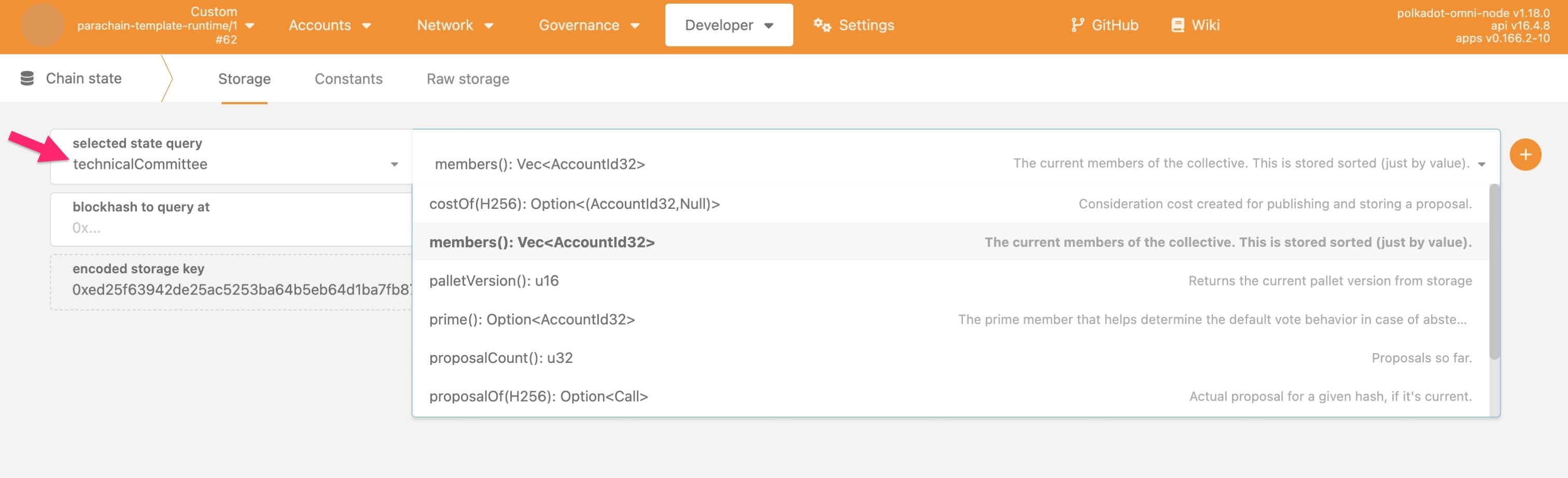
Select
council>members()to view council members.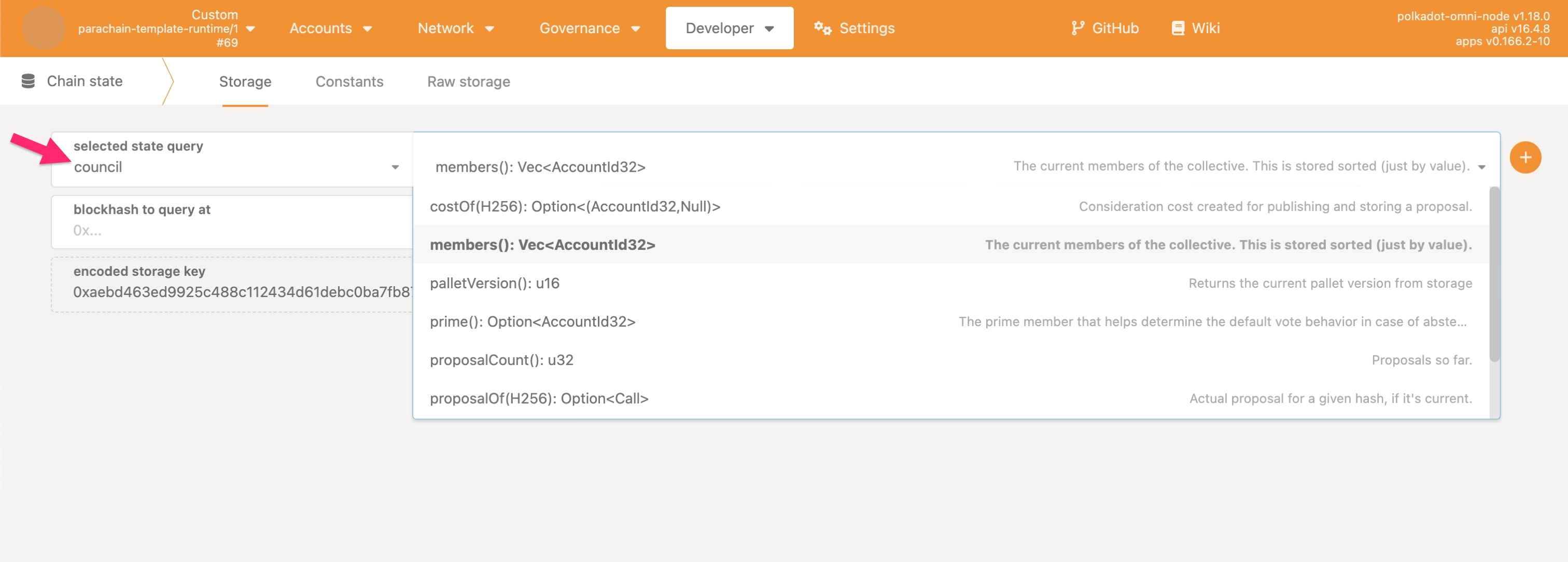
-
Verify that:
- Each instance maintains separate storage.
- Changes to one instance don't affect the other.
- Both instances can process proposals simultaneously.
You can now use both collective instances for different governance purposes in your parachain, such as technical decisions that require expertise and general governance decisions that require broader consensus.
Where to Go Next
-
Guide Make a Custom Pallet
Learn how to create custom pallets using FRAME.
| Created: January 14, 2026