Create a Custom Pallet

Introduction
Framework for Runtime Aggregation of Modular Entities (FRAME) provides a powerful set of tools for blockchain development through modular components called pallets. These Rust-based runtime modules allow you to build custom blockchain functionality with precision and flexibility. While FRAME includes a library of pre-built pallets, its true strength lies in creating custom pallets tailored to your specific needs.
In this guide, you'll learn how to build a custom counter pallet from scratch that demonstrates core pallet development concepts.
Prerequisites
Before you begin, ensure you have:
- Polkadot SDK dependencies installed.
- A Polkadot SDK Parchain Template set up locally.
- Basic familiarity with FRAME concepts.
Core Pallet Components
As you build your custom pallet, you'll work with these key sections:
- Imports and dependencies: Bring in necessary FRAME libraries and external modules.
- Runtime configuration trait: Specify types and constants for pallet-runtime interaction.
- Runtime events: Define signals that communicate state changes.
- Runtime errors: Define error types returned from dispatchable calls.
- Runtime storage: Declare on-chain storage items for your pallet's state.
- Genesis configuration: Set initial blockchain state.
- Dispatchable functions (extrinsics): Create callable functions for user interactions.
For additional macros beyond those covered here, refer to the pallet_macros section of the Polkadot SDK Docs.
Create the Pallet Project
Begin by creating a new Rust library project for your custom pallet within the Polkadot SDK Parachain Template:
-
Navigate to the root directory of your parachain template:
-
Navigate to the
palletsdirectory: -
Create a new Rust library project:
-
Enter the new project directory:
-
Verify the project structure. It should look like:
Configure Dependencies
To integrate your custom pallet into the Polkadot SDK-based runtime, configure the Cargo.toml file with the required dependencies. Since your pallet exists within the parachain template workspace, you'll use workspace inheritance to maintain version consistency.
-
Open
Cargo.tomland replace its contents with:pallet-custom/Cargo.toml[package] name = "pallet-custom" description = "A custom counter pallet for demonstration purposes." version = "0.1.0" license = "Unlicense" authors.workspace = true homepage.workspace = true repository.workspace = true edition.workspace = true publish = false [package.metadata.docs.rs] targets = ["x86_64-unknown-linux-gnu"] [dependencies] codec = { features = ["derive"], workspace = true } scale-info = { features = ["derive"], workspace = true } frame = { features = ["experimental", "runtime"], workspace = true } [features] default = ["std"] std = [ "codec/std", "scale-info/std", "frame/std", ]Version Management
The parachain template uses workspace inheritance to maintain consistent dependency versions across all packages. The actual versions are defined in the root
Cargo.tomlfile, ensuring compatibility throughout the project. By usingworkspace = true, your pallet automatically inherits the correct versions. -
The parachain template already includes
pallets/*in the workspace members, so your new pallet is automatically recognized. Verify this by checking the rootCargo.toml:
Initialize the Pallet Structure
With dependencies configured, set up the basic scaffold that will hold your pallet's logic:
-
Open
src/lib.rsand delete all existing content. -
Add the initial scaffold structure using the unified
framedependency:src/lib.rs#![cfg_attr(not(feature = "std"), no_std)] extern crate alloc; pub use pallet::*; #[frame::pallet] pub mod pallet { use frame::prelude::*; #[pallet::pallet] pub struct Pallet<T>(_); #[pallet::config] pub trait Config: frame_system::Config { // Configuration will be added here } #[pallet::storage] pub type CounterValue<T> = StorageValue<_, u32, ValueQuery>; #[pallet::call] impl<T: Config> Pallet<T> { // Dispatchable functions will be added here } }This setup starts with a minimal scaffold without events and errors. These will be added in the following sections after the
Configtrait is correctly configured with the requiredRuntimeEventtype. Theextern crate alloc;line is required because the pallet usesno_stdand will later useVecin the genesis configuration, which comes from thealloccrate rather than the standard library. -
Verify it compiles using the following command:
Configure the Pallet
The Config trait exposes configurable options and links your pallet to the runtime. All types and constants the pallet depends on must be declared here. These types are defined generically and become concrete when the pallet is instantiated at runtime.
Replace the #[pallet::config] section with:
#[pallet::config]
pub trait Config: frame_system::Config {
    /// The overarching runtime event type.
    type RuntimeEvent: From<Event<Self>> + IsType<<Self as frame_system::Config>::RuntimeEvent>;

    /// Maximum value the counter can reach.
    #[pallet::constant]
    type CounterMaxValue: Get<u32>;
}
Key configuration elements include the following:
RuntimeEvent: Required for the pallet to emit events that the runtime can process.CounterMaxValue: A constant that sets an upper limit on counter values, configurable per runtime.
Define Events
Events inform external entities (dApps, explorers, users) about significant runtime changes. Event details are included in the node's metadata, making them accessible to external tools.
The #[pallet::generate_deposit] macro automatically generates a deposit_event function that converts your pallet's events into the RuntimeEvent type and deposits them via frame_system::Pallet::deposit_event.
Add the #[pallet::event] section after the Config trait:
#[pallet::event]
#[pallet::generate_deposit(pub(super) fn deposit_event)]
pub enum Event<T: Config> {
    /// Counter value was explicitly set. [new_value]
    CounterValueSet {
        new_value: u32,
    },
    /// Counter was incremented. [new_value, who, amount]
    CounterIncremented {
        new_value: u32,
        who: T::AccountId,
        amount: u32,
    },
    /// Counter was decremented. [new_value, who, amount]
    CounterDecremented {
        new_value: u32,
        who: T::AccountId,
        amount: u32,
    },
}
Define Errors
Errors indicate when and why a call fails. Use informative names and descriptions, as error documentation is included in the node's metadata.
Error types must implement the TypeInfo trait, and runtime errors can be up to 4 bytes in size.
Add the #[pallet::error] section after the events:
#[pallet::error]
pub enum Error<T> {
    /// The counter value has not been set yet.
    NoneValue,
    /// Arithmetic operation would cause overflow.
    Overflow,
    /// Arithmetic operation would cause underflow.
    Underflow,
    /// The counter value would exceed the maximum allowed value.
    CounterMaxValueExceeded,
}
Add Storage Items
Storage items persist state on-chain. This pallet uses two storage items:
CounterValue: Stores the current counter value.UserInteractions: Tracks interaction counts per user account.
The initial scaffold already includes the CounterValue storage item. Now add the UserInteractions storage map after it:
/// Tracks the number of interactions per user.
#[pallet::storage]
pub type UserInteractions<T: Config> = StorageMap<_, Blake2_128Concat, T::AccountId, u32, ValueQuery>;
Your storage section should now look like this:
/// The current value of the counter.
#[pallet::storage]
pub type CounterValue<T> = StorageValue<_, u32, ValueQuery>;

/// Tracks the number of interactions per user.
#[pallet::storage]
pub type UserInteractions<T: Config> = StorageMap<_, Blake2_128Concat, T::AccountId, u32, ValueQuery>;
For more storage types and patterns, explore the Polkadot SDK storage documentation.
Configure Genesis State
Genesis configuration allows you to set the initial state of your pallet when the blockchain first starts and is essential for both production networks and testing environments. It is beneficial for:
- Setting initial parameter values.
- Pre-allocating resources or accounts.
- Establishing starting conditions for testing.
- Configuring network-specific initial state.
Since the genesis configuration uses Vec for initial_user_interactions, you need to import it from the alloc crate. Add this import at the top of your pallet module, after the use frame::prelude::*; line:
Add the #[pallet::genesis_config] and #[pallet::genesis_build] sections after your storage items:
#[pallet::genesis_config]
#[derive(DefaultNoBound)]
pub struct GenesisConfig<T: Config> {
    /// Initial value for the counter
    pub initial_counter_value: u32,
    /// Pre-populated user interactions
    pub initial_user_interactions: Vec<(T::AccountId, u32)>,
}

#[pallet::genesis_build]
impl<T: Config> BuildGenesisConfig for GenesisConfig<T> {
    fn build(&self) {
        // Set the initial counter value
        CounterValue::<T>::put(self.initial_counter_value);

        // Set initial user interactions
        for (account, count) in &self.initial_user_interactions {
            UserInteractions::<T>::insert(account, count);
        }
    }
}
Genesis configuration components include the following:
GenesisConfigstruct: Defines what can be configured at genesis.#[derive(DefaultNoBound)]: Provides sensible defaults (empty vec and 0 for the counter).BuildGenesisConfigimplementation: Executes the logic to set initial storage values.build()method: Called once when the blockchain initializes.
Implement Dispatchable Functions
Dispatchable functions (extrinsics) allow users to interact with your pallet and trigger state changes. Each function must:
- Return a
DispatchResult. - Be annotated with a weight (computational cost).
- Have an explicit call index for backward compatibility.
Replace the #[pallet::call] section with:
#[pallet::call]
impl<T: Config> Pallet<T> {
    /// Set the counter to a specific value. Root origin only.
    #[pallet::call_index(0)]
    #[pallet::weight(0)]
    pub fn set_counter_value(origin: OriginFor<T>, new_value: u32) -> DispatchResult {
        // Ensure the caller is root
        ensure_root(origin)?;

        // Validate the new value doesn't exceed the maximum
        ensure!(new_value <= T::CounterMaxValue::get(), Error::<T>::CounterMaxValueExceeded);

        // Update storage
        CounterValue::<T>::put(new_value);

        // Emit event
        Self::deposit_event(Event::CounterValueSet { new_value });

        Ok(())
    }

    /// Increment the counter by a specified amount.
    #[pallet::call_index(1)]
    #[pallet::weight(0)]
    pub fn increment(origin: OriginFor<T>, amount: u32) -> DispatchResult {
        // Ensure the caller is signed
        let who = ensure_signed(origin)?;

        // Get current counter value
        let current_value = CounterValue::<T>::get();

        // Check for overflow
        let new_value = current_value.checked_add(amount).ok_or(Error::<T>::Overflow)?;

        // Ensure new value doesn't exceed maximum
        ensure!(new_value <= T::CounterMaxValue::get(), Error::<T>::CounterMaxValueExceeded);

        // Update counter storage
        CounterValue::<T>::put(new_value);

        // Track user interaction
        UserInteractions::<T>::mutate(&who, |count| {
            *count = count.saturating_add(1);
        });

        // Emit event
        Self::deposit_event(Event::CounterIncremented {
            new_value,
            who,
            amount,
        });

        Ok(())
    }

    /// Decrement the counter by a specified amount.
    #[pallet::call_index(2)]
    #[pallet::weight(0)]
    pub fn decrement(origin: OriginFor<T>, amount: u32) -> DispatchResult {
        // Ensure the caller is signed
        let who = ensure_signed(origin)?;

        // Get current counter value
        let current_value = CounterValue::<T>::get();

        // Check for underflow
        let new_value = current_value.checked_sub(amount).ok_or(Error::<T>::Underflow)?;

        // Update counter storage
        CounterValue::<T>::put(new_value);

        // Track user interaction
        UserInteractions::<T>::mutate(&who, |count| {
            *count = count.saturating_add(1);
        });

        // Emit event
        Self::deposit_event(Event::CounterDecremented {
            new_value,
            who,
            amount,
        });

        Ok(())
    }
}
Dispatchable Function Details
set_counter_value
- Access: Root origin only (privileged operations).
- Purpose: Set counter to a specific value.
- Validations: New value must not exceed
CounterMaxValue. - State changes: Updates
CounterValuestorage. - Events: Emits
CounterValueSet.
increment
- Access: Any signed account.
- Purpose: Increase counter by specified amount.
- Validations: Checks for overflow and max value compliance.
- State changes: Updates
CounterValueandUserInteractions. - Events: Emits
CounterIncremented.
decrement
- Access: Any signed account.
- Purpose: Decrease counter by specified amount.
- Validations: Checks for underflow.
- State changes: Updates
CounterValueandUserInteractions. - Events: Emits
CounterDecremented.
Verify Pallet Compilation
Before proceeding, ensure your pallet compiles without errors by running the following command:
If you encounter errors, carefully review the code against this guide. Once the build completes successfully, your custom pallet is ready for integration.
Complete Pallet Implementation
#![cfg_attr(not(feature = "std"), no_std)]

extern crate alloc;

pub use pallet::*;

#[frame::pallet]
pub mod pallet {
    use alloc::vec::Vec;
    use frame::prelude::*;

    #[pallet::pallet]
    pub struct Pallet<T>(_);

    #[pallet::config]
    pub trait Config: frame_system::Config {
        type RuntimeEvent: From<Event<Self>> + IsType<<Self as frame_system::Config>::RuntimeEvent>;

        #[pallet::constant]
        type CounterMaxValue: Get<u32>;
    }

    #[pallet::event]
    #[pallet::generate_deposit(pub(super) fn deposit_event)]
    pub enum Event<T: Config> {
        CounterValueSet {
            new_value: u32,
        },
        CounterIncremented {
            new_value: u32,
            who: T::AccountId,
            amount: u32,
        },
        CounterDecremented {
            new_value: u32,
            who: T::AccountId,
            amount: u32,
        },
    }

    #[pallet::error]
    pub enum Error<T> {
        NoneValue,
        Overflow,
        Underflow,
        CounterMaxValueExceeded,
    }

    #[pallet::storage]
    pub type CounterValue<T> = StorageValue<_, u32, ValueQuery>;

    #[pallet::storage]
    pub type UserInteractions<T: Config> = StorageMap<
        _,
        Blake2_128Concat,
        T::AccountId,
        u32,
        ValueQuery
    >;

    #[pallet::genesis_config]
    #[derive(DefaultNoBound)]
    pub struct GenesisConfig<T: Config> {
        pub initial_counter_value: u32,
        pub initial_user_interactions: Vec<(T::AccountId, u32)>,
    }

    #[pallet::genesis_build]
    impl<T: Config> BuildGenesisConfig for GenesisConfig<T> {
        fn build(&self) {
            CounterValue::<T>::put(self.initial_counter_value);
            for (account, count) in &self.initial_user_interactions {
                UserInteractions::<T>::insert(account, count);
            }
        }
    }

    #[pallet::call]
    impl<T: Config> Pallet<T> {
        #[pallet::call_index(0)]
        #[pallet::weight(0)]
        pub fn set_counter_value(origin: OriginFor<T>, new_value: u32) -> DispatchResult {
            ensure_root(origin)?;
            ensure!(new_value <= T::CounterMaxValue::get(), Error::<T>::CounterMaxValueExceeded);
            CounterValue::<T>::put(new_value);
            Self::deposit_event(Event::CounterValueSet { new_value });
            Ok(())
        }

        #[pallet::call_index(1)]
        #[pallet::weight(0)]
        pub fn increment(origin: OriginFor<T>, amount: u32) -> DispatchResult {
            let who = ensure_signed(origin)?;
            let current_value = CounterValue::<T>::get();
            let new_value = current_value.checked_add(amount).ok_or(Error::<T>::Overflow)?;
            ensure!(new_value <= T::CounterMaxValue::get(), Error::<T>::CounterMaxValueExceeded);
            CounterValue::<T>::put(new_value);
            UserInteractions::<T>::mutate(&who, |count| {
                *count = count.saturating_add(1);
            });
            Self::deposit_event(Event::CounterIncremented { new_value, who, amount });
            Ok(())
        }

        #[pallet::call_index(2)]
        #[pallet::weight(0)]
        pub fn decrement(origin: OriginFor<T>, amount: u32) -> DispatchResult {
            let who = ensure_signed(origin)?;
            let current_value = CounterValue::<T>::get();
            let new_value = current_value.checked_sub(amount).ok_or(Error::<T>::Underflow)?;
            CounterValue::<T>::put(new_value);
            UserInteractions::<T>::mutate(&who, |count| {
                *count = count.saturating_add(1);
            });
            Self::deposit_event(Event::CounterDecremented { new_value, who, amount });
            Ok(())
        }
    }
}
Add the Pallet to Your Runtime
Now that your custom pallet is complete, you can integrate it into the parachain runtime.
Add Runtime Dependency
-
In the
runtime/Cargo.toml, add your custom pallet to the[dependencies]section: -
Enable the
stdfeature by adding it to the[features]section:
Implement the Config Trait
At the end of the runtime/src/configs/mod.rs file, add the implementation:
/// Configure the custom counter pallet
impl pallet_custom::Config for Runtime {
    type RuntimeEvent = RuntimeEvent;
    type CounterMaxValue = ConstU32<1000>;
}
This configuration:
- Links the pallet's events to the runtime's event system.
- Sets a maximum counter value of 1000 using
ConstU32.
Add to Runtime Construct
In the runtime/src/lib.rs file, locate the #[frame_support::runtime] section and add your pallet with a unique pallet_index:
#[frame_support::runtime]
mod runtime {
    #[runtime::runtime]
    #[runtime::derive(
        RuntimeCall,
        RuntimeEvent,
        RuntimeError,
        RuntimeOrigin,
        RuntimeTask,
        RuntimeFreezeReason,
        RuntimeHoldReason,
        RuntimeSlashReason,
        RuntimeLockId,
        RuntimeViewFunction
    )]
    pub struct Runtime;

    #[runtime::pallet_index(0)]
    pub type System = frame_system;

    // ... other pallets

    #[runtime::pallet_index(51)]
    pub type CustomPallet = pallet_custom;
}
Warning
Each pallet must have a unique index. Duplicate indices will cause compilation errors. Choose an index that doesn't conflict with existing pallets.
Configure Genesis for Your Runtime
To set initial values for your pallet when the chain starts, you'll need to configure the genesis in your chain specification. Genesis configuration is typically done in the node/src/chain_spec.rs file or when generating the chain specification.
For development and testing, you can use the default values provided by the #[derive(DefaultNoBound)] macro. For production networks, you'll want to explicitly set these values in your chain specification.
Verify Runtime Compilation
Compile the runtime to ensure everything is configured correctly:
This command validates all pallet configurations and prepares the build for deployment.
Run Your Chain Locally
Launch your parachain locally to test the new pallet functionality using the Polkadot Omni Node. For instructions on setting up the Polkadot Omni Node and Polkadot Chain Spec Builder, refer to the Set Up a Parachain Template guide.
Generate a Chain Specification
Create a chain specification file with the updated runtime:
chain-spec-builder create -t development \
--relay-chain paseo \
--para-id 1000 \
--runtime ./target/release/wbuild/parachain-template-runtime/parachain_template_runtime.compact.compressed.wasm \
named-preset development
This command generates a chain_spec.json that includes your custom pallet.
Start the Parachain Node
Launch the parachain:
Verify the node starts successfully and begins producing blocks.
Interact with Your Pallet
Use the Polkadot.js Apps interface to test your pallet:
-
Navigate to Polkadot.js Apps.
-
Ensure you're connected to your local node at
ws://127.0.0.1:9944. -
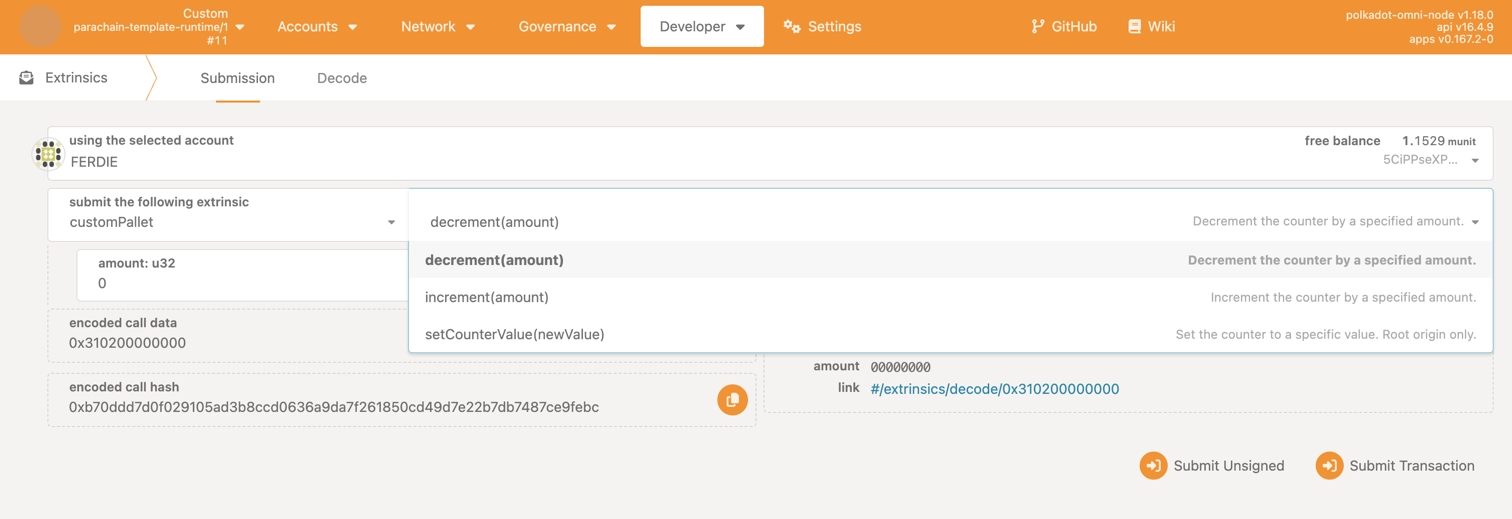
Go to Developer > Extrinsics.
-
Locate customPallet in the pallet dropdown.
-
You should see the available extrinsics:
increment(amount): Increase the counter by a specified amount.decrement(amount): Decrease the counter by a specified amount.setCounterValue(newValue): Set counter to a specific value (requires sudo/root).
Key Takeaways
You've successfully created and integrated a custom pallet into a Polkadot SDK-based runtime. You have now successfully:
- Defined runtime-specific types and constants via the
Configtrait. - Implemented on-chain state using
StorageValueandStorageMap. - Created signals to communicate state changes to external systems.
- Established clear error handling with descriptive error types.
- Configured initial blockchain state for both production and testing.
- Built callable functions with proper validation and access control.
- Added the pallet to a runtime and tested it locally.
These components form the foundation for developing sophisticated blockchain logic in Polkadot SDK-based chains.
Where to Go Next
-
Guide Mock Your Runtime
Learn to create a mock runtime environment for testing your pallet in isolation before integration.
| Created: January 14, 2026