Remix IDE
Introduction
Remix is a browser-based IDE that makes it easy to write, compile, and deploy smart contracts without installing any local tools. It’s a great place to experiment, learn, and quickly test contracts on Polkadot. You can generate ERC-20, ERC-721, or other OpenZeppelin-standard contracts with the OpenZeppelin Contracts Wizard for Polkadot, then paste the code into Remix to compile and deploy. This page introduces the main parts of the Remix interface and shows how to connect it to Polkadot so you can deploy and interact with contracts directly from your browser.
Prerequisites
Before getting started, ensure you have:
- A browser with the MetaMask extension installed
- MetaMask connected to Polkadot (see the Wallet Integrations guide for setup steps)
Access Remix IDE
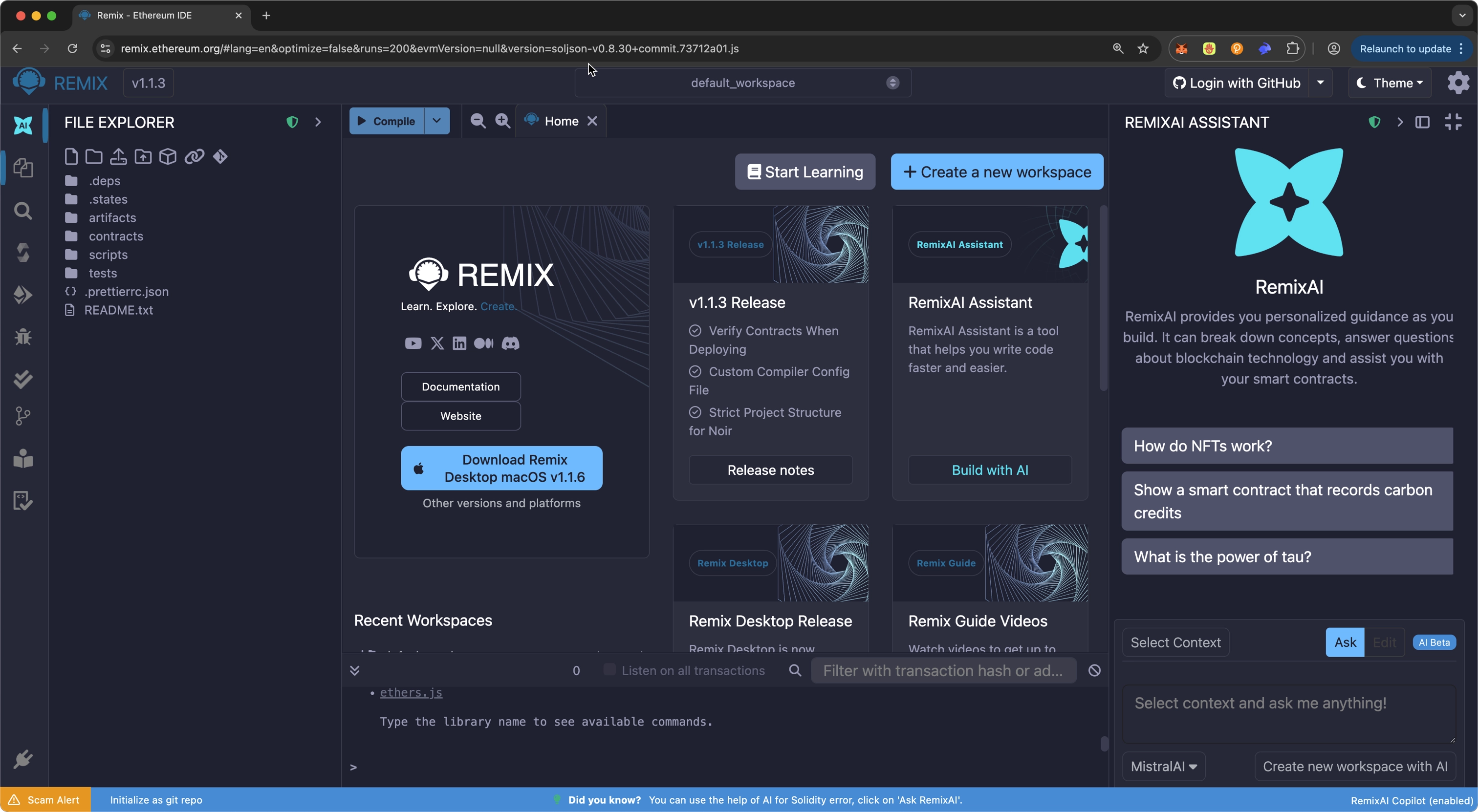
Navigate to https://remix.ethereum.org/. The interface will load with a default workspace containing sample contracts. In this interface, you can access the following:
- Editor panel: The main coding area where you write and modify your smart contract files. Supports syntax highlighting, auto-completion, and linting.
- Terminal: Shows logs from the compiler, deployment events, transactions, and console.log output. Useful for debugging and tracking execution.
-
Plugin panel: Displays icons for each of the preloaded plugins, the plugin manager, and the settings menu. You'll see a few icons there for each of the preloaded plugins:
- File explorer: Displays your project workspace. You can create, open, rename, and organize Solidity files, scripts, and folders.
- File search: A quick search tool for finding symbols, functions, or text within your project files.
- Solidity compiler: A plugin that compiles your Solidity contracts. It allows you to select compiler versions, enable optimizations, and view compilation errors or warnings.
- Deploy & run transactions: Used to deploy contracts and interact with them. Allows you to choose an environment (JavaScript VM, injected provider, or custom RPC), deploy contracts, send transactions, and call read/write functions.
- Debugger: Allows you to step through a transaction execution line-by-line. You can inspect variables, stack values, storage slots, and opcodes to understand exactly how your contract behaved during a specific transaction.
- Git: Enables basic Git version control directly inside Remix. You can initialize repositories, view diffs, commit changes, and browse project history without needing an external Git client.
Connect Remix to Polkadot
You can connect Remix to Polkadot from the Deploy & run transactions tab in the plugin panel:
- Switch your MetaMask network to Polkadot. For detailed steps on setting up MetaMask for Polkadot, see the Wallet Integrations guide.
- Click on the Environment dropdown.
- Hover over browser extension.
- Select Injected Provider - MetaMask.
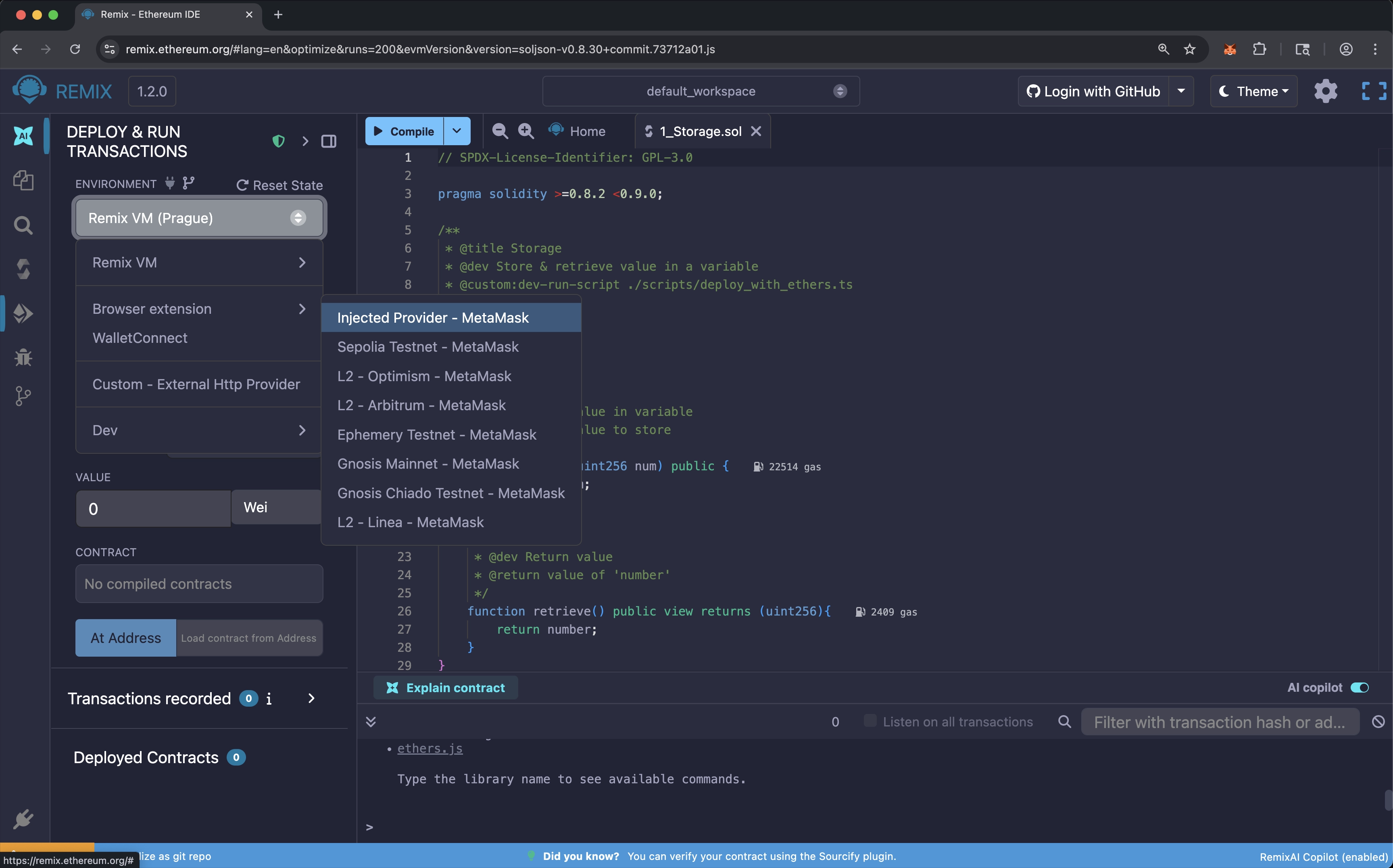
Once connected, Remix will display your MetaMask account address under Accounts. To switch accounts, change it in MetaMask—Remix updates automatically.
Where to Go Next
-
Guide Deploy a Basic Contract
Ready to start using Remix? Learn how to compile, test, and deploy a basic contract.
-
Guide Deploy an ERC-20
Walk through deploying a fully-functional ERC-20 to Polkadot Hub using Remix.
-
Guide Deploy an NFT
Walk through deploying an NFT to Polkadot Hub using Remix.
| Created: January 14, 2026