Storage Precompile
Introduction
The Storage precompile provides low-level access to contract storage operations at the runtime level. Located at the fixed address 0x0000000000000000000000000000000000000901, it offers a comprehensive set of utilities, including:
- Direct storage access: Read and write raw storage keys and values.
- Partial reads: Retrieve specific segments of large values to optimize gas costs.
- Storage inspection: Check for key existence and value sizes.
- Storage management: Efficiently remove and manage storage entries.
This precompile is particularly useful for contracts that need fine-grained control over storage layout, want to optimize gas costs for large data structures, or need to implement custom storage patterns.
Precompile Interface
The Storage precompile implements the IStorage interface, which is defined in the Polkadot SDK. The source code for the interface is as follows:
// SPDX-License-Identifier: MIT
pragma solidity ^0.8.0;

address constant STORAGE_ADDR = 0x0000000000000000000000000000000000000901;

interface IStorage {
    /// Clear the value at the given key in the contract storage.
    ///
    /// # Important
    ///
    /// This function can only be called via a delegate call! For Solidity, the low level
    /// `delegatecall` function has to be used. For languages that use the FFI
    /// of `pallet-revive`, the [`crate::HostFn::delegate_call`] function can be used.
    ///
    /// # Parameters
    ///
    /// - `key`: The storage key.
    ///
    /// # Return
    ///
    /// If no entry existed for this key, `containedKey` is `false` and
    /// `valueLen` is `0`.
    function clearStorage(uint32 flags, bool isFixedKey, bytes memory key)
        external returns (bool containedKey, uint valueLen);

    /// Checks whether there is a value stored under the given key.
    ///
    /// The key length must not exceed the maximum defined by the contracts module parameter.
    ///
    /// # Important
    ///
    /// This function can only be called via a delegate call! For Solidity, the low level
    /// `delegatecall` function has to be used. For languages that use the FFI
    /// of `pallet-revive`, the [`crate::HostFn::delegate_call`] function can be used.
    ///
    /// # Parameters
    ///
    /// - `key`: The storage key.
    ///
    /// # Return
    ///
    /// Returns the size of the pre-existing value at the specified key.
    /// If no entry exists for this key `containedKey` is `false` and
    /// `valueLen` is `0`.
    function containsStorage(uint32 flags, bool isFixedKey, bytes memory key)
        external view returns (bool containedKey, uint valueLen);

    /// Retrieve and remove the value under the given key from storage.
    ///
    /// # Important
    ///
    /// This function can only be called via a delegate call! For Solidity, the low level
    /// `delegatecall` function has to be used. For languages that use the FFI
    /// of `pallet-revive`, the [`crate::HostFn::delegate_call`] function can be used.
    ///
    /// # Parameters
    ///
    /// - `key`: The storage key.
    ///
    /// # Errors
    ///
    /// Returns empty bytes if no value was found under `key`.
    function takeStorage(uint32 flags, bool isFixedKey, bytes memory key)
        external returns (bytes memory);
}
For the complete implementation, refer to the IStorage.sol file in the Polkadot SDK.
Reading Storage
Read Full Value
Retrieves the complete value stored at a given storage key. This is the most straightforward way to access storage data.
Parameters:
key: The storage key to read from.
Returns:
bytes memory: The complete value stored at the key.
Example usage:
IStorage storage = IStorage(STORAGE_ADDR);
bytes32 key = keccak256("myStorageKey");
bytes memory value = storage.get(key);
Note
This function will revert if the key does not exist in storage. Use has_key to check existence first if needed.
Read Partial Value
Reads a specific segment of a stored value, defined by an offset and length. This is useful for handling large values efficiently without loading the entire data into memory.
Parameters:
key: The storage key to read from.offset: Starting byte position within the stored value.length: Number of bytes to read.
Returns:
bytes memory: The requested segment of the stored value.
Example usage:
IStorage storage = IStorage(STORAGE_ADDR);
bytes32 key = keccak256("largeData");

// Read bytes 100-200 of a large stored value
bytes memory segment = storage.get_range(key, 100, 100);
Warning
This function will revert if the sum of offset and length exceeds the actual length of the stored value.
Read Value Prefix
Retrieves up to a specified number of bytes from the beginning of a stored value. If the stored value is shorter than the requested length, only the available bytes are returned.
Parameters:
key: The storage key to read from.max_length: Maximum number of bytes to read from the start.
Returns:
bytes memory: The prefix of the stored value (up tomax_lengthbytes).
Example usage:
IStorage storage = IStorage(STORAGE_ADDR);
bytes32 key = keccak256("userData");

// Read first 32 bytes (might be a header or metadata)
bytes memory header = storage.get_prefix(key, 32);
Writing Storage
Write Value
Writes or overwrites a value at a specified storage key. This operation completely replaces any existing value at the key.
Parameters:
key: The storage key to write to.value: The data to store.
Example usage:
IStorage storage = IStorage(STORAGE_ADDR);
bytes32 key = keccak256("myData");
bytes memory data = abi.encode("Hello Polkadot!");

storage.set(key, data);
Note
Large storage writes can be expensive in terms of gas. Breaking large data into smaller chunks is recommended.
Remove Value
Deletes the value stored at a specified key, freeing up storage space and potentially refunding gas.
Parameters:
key: The storage key to delete.
Example usage:
IStorage storage = IStorage(STORAGE_ADDR);
bytes32 key = keccak256("obsoleteData");

storage.remove(key);
Storage Inspection
Check Key Existence
Checks whether a given storage key exists, even if the stored value is empty.
Parameters:
key: The storage key to check.
Returns:
bool:trueif the key exists,falseotherwise.
Example usage:
IStorage storage = IStorage(STORAGE_ADDR);
bytes32 key = keccak256("maybeExists");

if (storage.has_key(key)) {
    bytes memory value = storage.get(key);
    // Process value...
} else {
    // Handle missing data...
}
Get Value Length
Returns the byte length of the value stored at a key without reading the actual data. This is useful for determining how much data exists before reading it.
Parameters:
key: The storage key to query.
Returns:
uint32: The length in bytes of the stored value.
Example usage:
IStorage storage = IStorage(STORAGE_ADDR);
bytes32 key = keccak256("largeFile");

uint32 size = storage.length(key);
if (size > 10000) {
    // Handle large value with partial reads
    bytes memory chunk = storage.get_range(key, 0, 1000);
} else {
    // Small enough to read in full
    bytes memory value = storage.get(key);
}
Note
This function will revert if the key does not exist.
Interact with the Storage Precompile
To interact with the Storage precompile in Remix IDE:
- Create a new file called
IStorage.solin Remix. -
Copy and paste the
IStorageinterface code into the file.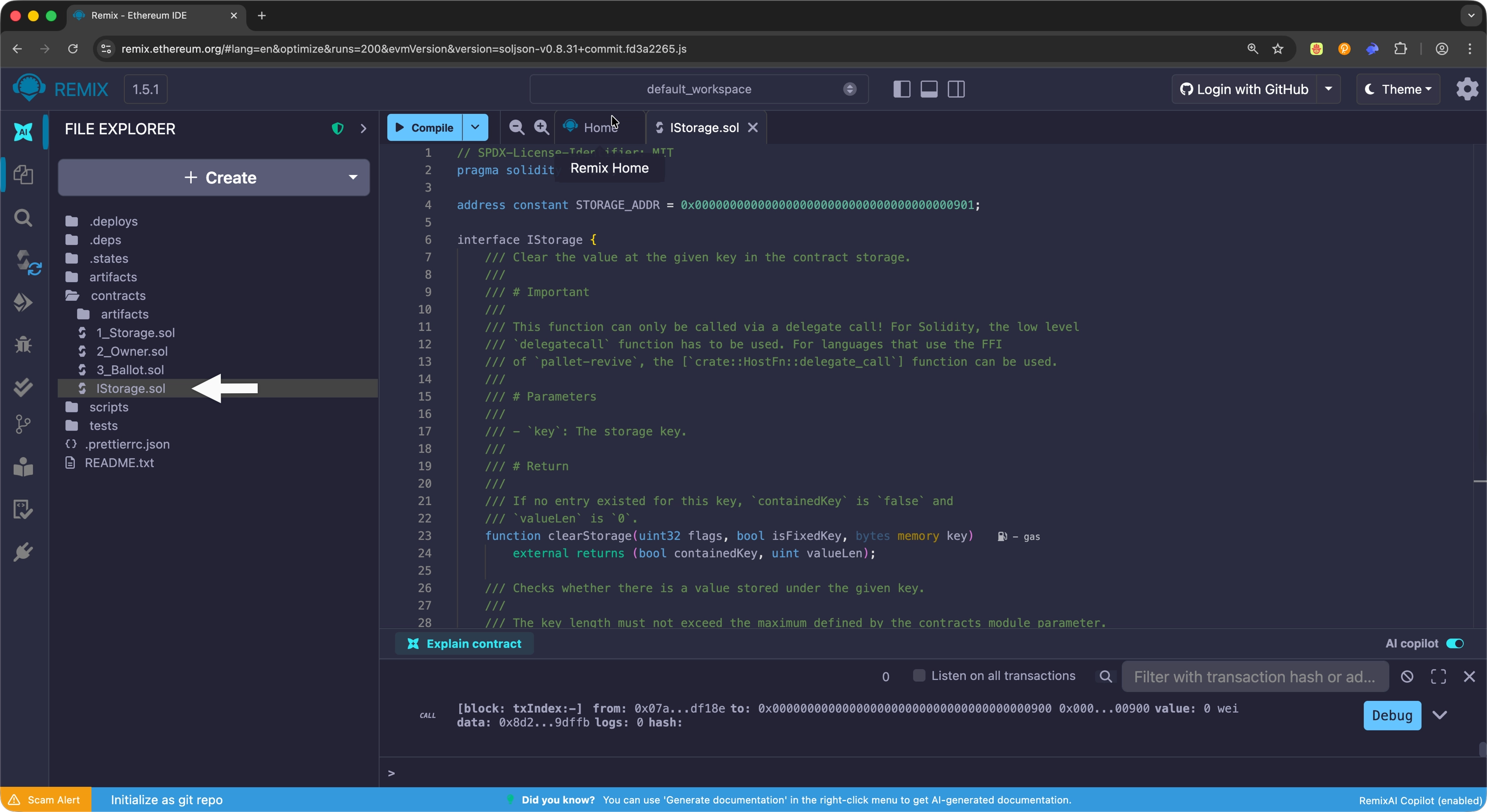
-
Compile the interface using the Compile button at the top or press Ctrl + S.
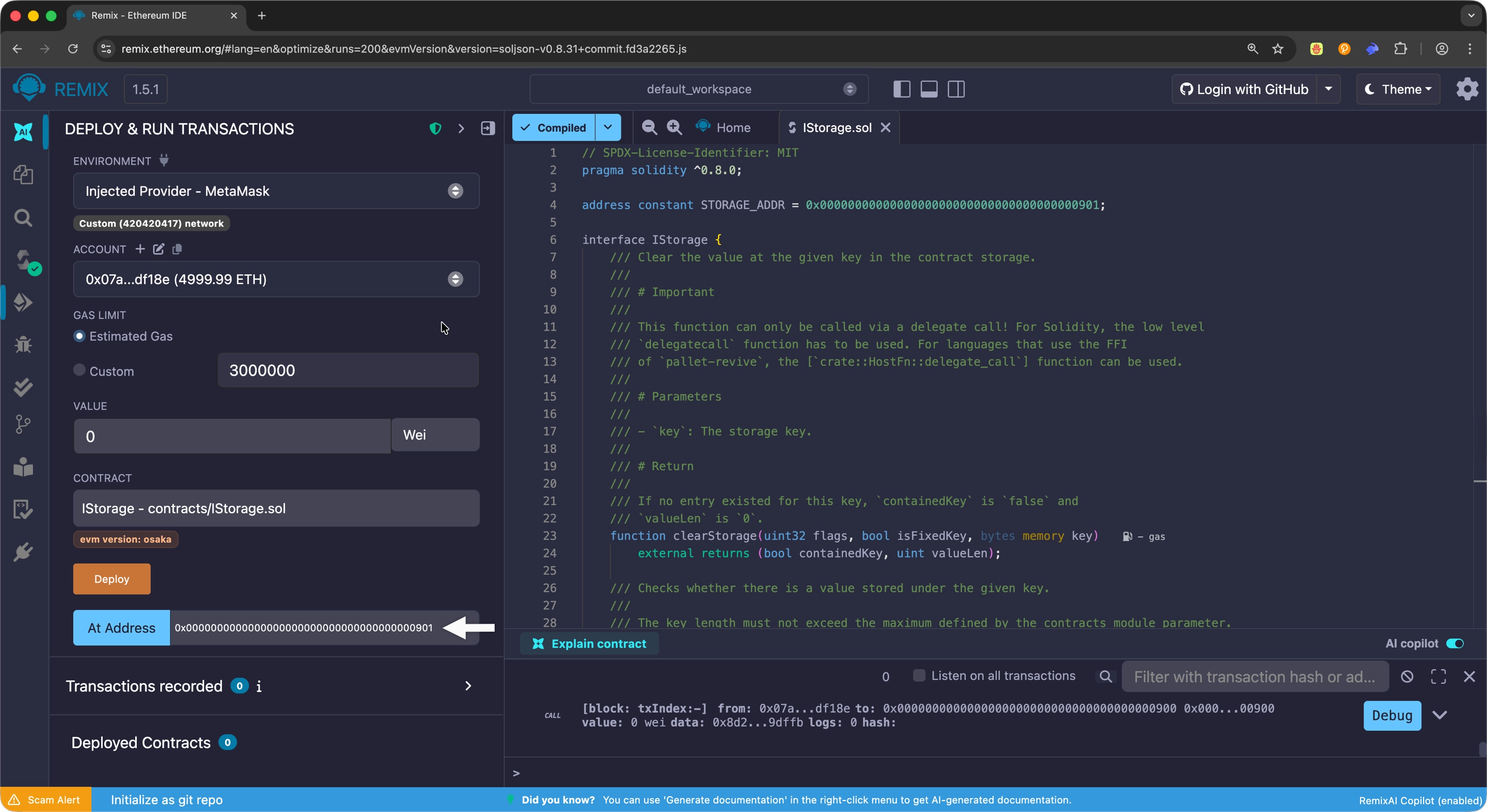
- In the Deploy & Run Transactions tab, select the
IStorageinterface from the contract dropdown. - Enter the precompile address
0x0000000000000000000000000000000000000901in the At Address input field. -
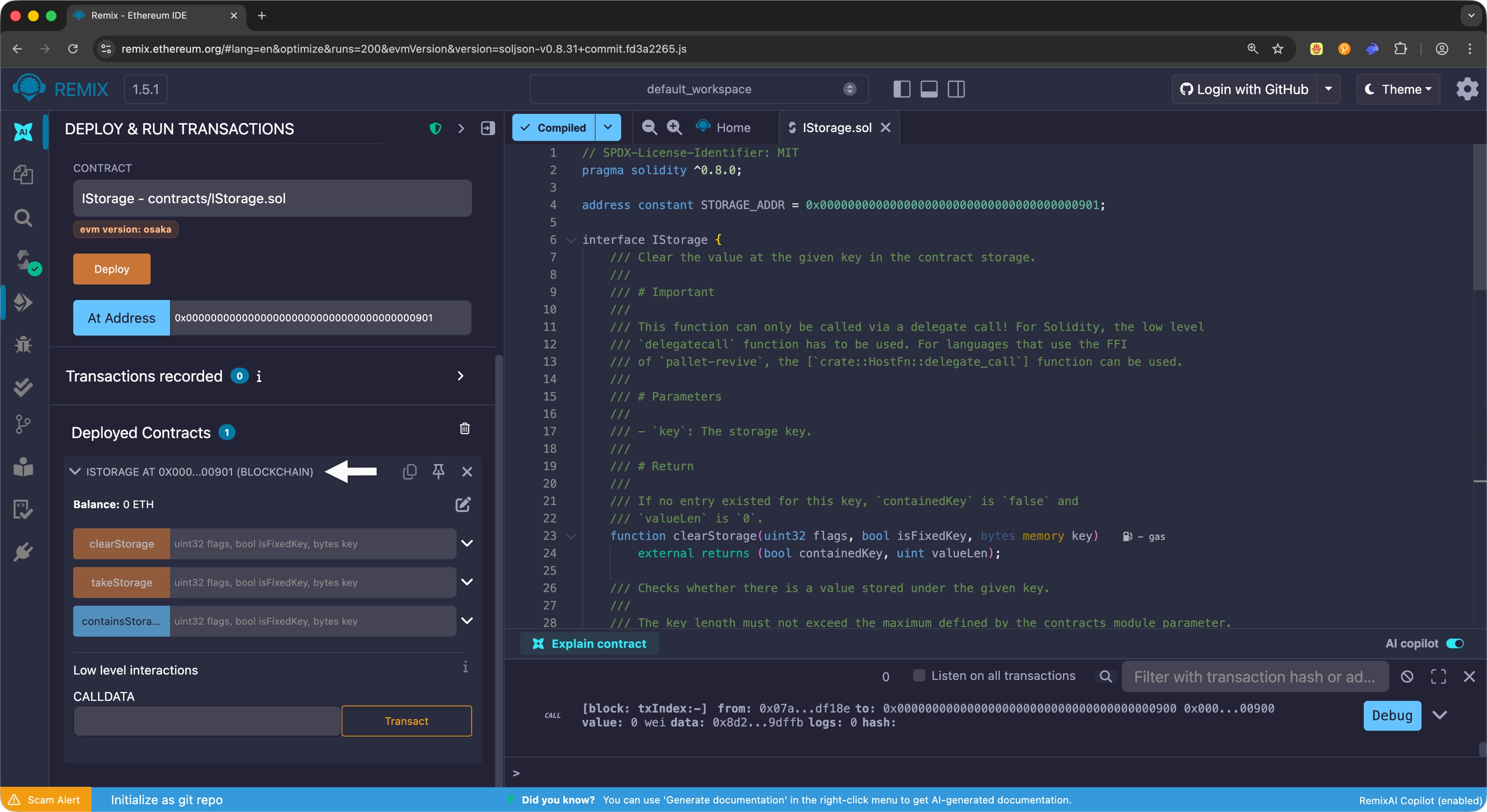
Select the At Address button to connect to the precompile.
Once connected, you can interact with any Storage precompile function directly through the Remix interface.
Conclusion
The Storage precompile provides essential building blocks for smart contracts that need low-level access to storage operations. By offering direct control over storage keys and values, partial reads for optimization, and efficient storage management functions, it enables developers to build sophisticated applications with fine-grained storage control.
Whether you're building custom data structures that require specific storage layouts, optimizing gas costs for large datasets through chunked reads, or implementing specialized storage systems, the Storage precompile offers the necessary tools to work directly with the runtime's storage layer.
Reference
| Created: January 27, 2026