Obtain Coretime
Introduction
After deploying a parachain to Paseo in the Deploy on Polkadot tutorial, the next critical step is obtaining coretime. Coretime is the mechanism through which validation resources are allocated from the relay chain to your parachain. Your parachain can only produce and finalize blocks on the relay chain by obtaining coretime.
There are two primary ways to obtain coretime:
- On-demand coretime: Purchase coretime on a block-by-block basis, ideal for variable or unpredictable workloads.
- Bulk coretime: Obtain a core or portion of a core for an extended period (up to 28 days), requiring renewal upon lease expiration.
In this tutorial, you will:
- Understand the different coretime options available.
- Learn how bulk coretime is purchased and assigned to a parachain.
- Explore on-demand coretime as an alternative approach.
Prerequisites
Before proceeding, ensure you have the following:
- A parachain ID reserved on Paseo.
- A properly configured chain specification file (both plain and raw versions).
- A registered parathread with the correct genesis state and runtime.
- A synced collator node running and connected to the Paseo relay chain.
- PAS tokens in your account on the Coretime Chain for transaction fees.
If you haven't completed these prerequisites, start by referring to the Deploy on Polkadot tutorial.
Order On-Demand Coretime
On-demand coretime allows you to purchase validation resources on a per-block basis. This approach is useful when you don't need continuous block production or want to test your parachain before committing to bulk coretime.
On-Demand Extrinsics
There are two extrinsics available for ordering on-demand coretime:
onDemand.placeOrderAllowDeath: Will reap the account once the provided funds are depleted.onDemand.placeOrderKeepAlive: Includes a check to prevent reaping the account, ensuring it remains alive even if funds run out.
Place an On-Demand Order
To place an on-demand coretime order, follow these steps:
-
Open the Polkadot.js Apps interface connected to the Polkadot TestNet (Paseo).
-
Navigate to Developer > Extrinsics in the top menu.
-
Select the account that registered your parachain ID.
-
From the submit the following extrinsic dropdown, select onDemand and then choose placeOrderAllowDeath as the extrinsic.
-
Configure the parameters:
- maxAmount: The maximum amount of tokens you're willing to spend (e.g.,
1000000000000). This value may vary depending on network conditions. - paraId: Your reserved parachain ID (e.g.,
4508).
- maxAmount: The maximum amount of tokens you're willing to spend (e.g.,
-
Review the transaction details and click Submit Transaction.
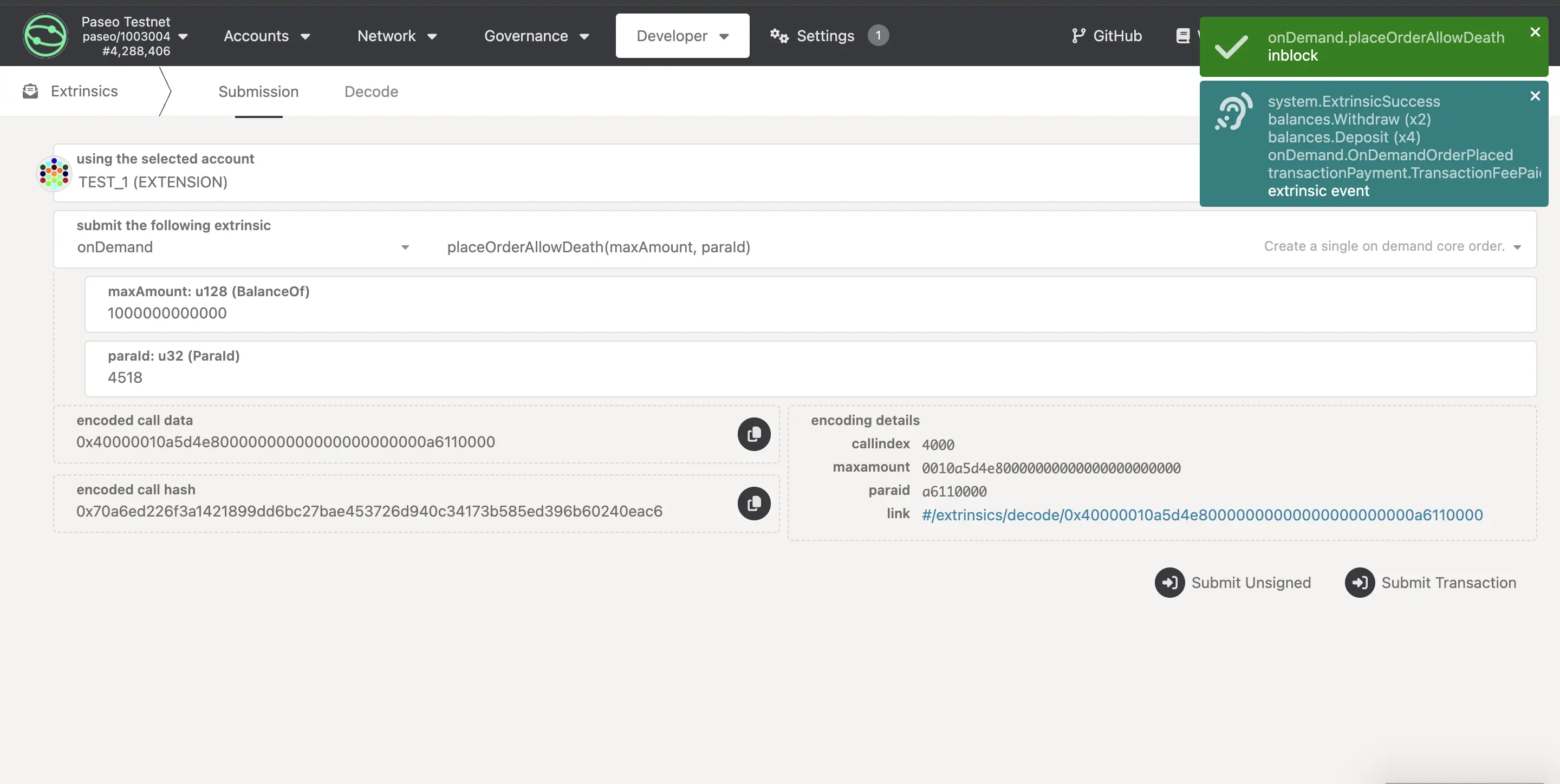
Upon successful submission, your parachain will produce a new block. You can verify this by checking your collator node logs, which should display output confirming block production.
Note
Each successful on-demand extrinsic will trigger one block production cycle. For continuous block production, you'll need to place multiple orders or consider bulk coretime.
Purchase Bulk Coretime
Bulk coretime offers a cost-effective way to maintain continuous block production. It lets you reserve a core for up to 28 days and renew it as needed.
You purchase and manage cores on the Coretime Chain, a system parachain that runs pallet_broker to handle core sales, allocation, and renewal across the Polkadot ecosystem.
Bulk Coretime Extrinsics
Obtaining bulk coretime for a parachain takes two extrinsics on the Coretime Chain:
broker.purchase: Buys a core in the current sale. Theprice_limitparameter caps what you pay, and the call fails with anOverpricederror if the current price is higher. A successful purchase emits aPurchasedevent containing theregion_idof the region you now own.broker.assign: Assigns a region you own to a task, which for a parachain is its parachain ID. Thefinalityparameter is eitherProvisional, which keeps the region with you so you can change the assignment later, orFinal, which fixes the assignment and makes the region eligible for renewal. ChooseFinalif you plan to renew the core.
The region you buy covers the sale's upcoming period, so your parachain starts producing blocks on that core when the region begins, not immediately after assignment.
Obtain Coretime Chain Funds
To purchase a core, you need funds on the Coretime Chain. You can fund your account directly on the Coretime Chain using the Polkadot Faucet:
-
Visit the Polkadot Faucet.
-
Select the Coretime (Paseo) network from the dropdown menu.
-
Paste your wallet address in the input field.
-
Click Get some PASs to receive 5000 PAS tokens.
Note
The Polkadot Faucet has a daily limit of 5,000 PAS tokens per account. If you need more tokens than this limit allows, you have two options:
- Return to the faucet on consecutive days to accumulate additional tokens.
- Create additional accounts, fund each one separately, and then transfer the tokens to your primary account that will be making the bulk coretime purchase.
Alternatively, to expedite the process, you can send a message to the Paseo Support channel on Matrix, and the Paseo team will assist you in funding your account.
Obtain a Core on Paseo
Paseo allocates cores through its own onboarding process, which prioritizes teams based on the resources available on the network:
-
Read the PAS-10 Onboard Paras Coretime guide, which describes the onboarding flow.
-
Open a parachain onboarding issue in the Paseo support repository.
-
Once the Paseo team has processed your request, purchase a core with
broker.purchaseand assign it to your parachain ID withbroker.assign, usingFinalfinality if you plan to renew.
If no cores are available or you run into problems, follow up on your onboarding issue or ask in the Paseo Support channel on Matrix.
Verify Block Production
Once the region assigned to your parachain begins, check your collator node logs. They should show new blocks being produced and finalized, provided your collator is running and synced with the relay chain.
Next Steps
Your parachain is now set up for block production. Consider the following:
- Monitor your collator: Keep your collator node running and monitor its performance.
- Plan coretime renewal: If using bulk coretime, plan to renew your core before the current lease expires.
- Explore runtime upgrades: Once comfortable with your setup, explore how to upgrade your parachain's runtime without interrupting block production.
| Created: January 14, 2026